a. How to Add Cargo
There are four methods for adding cargo: Directly Add, Import from Excel, Import from Database, and Import(Order Form Mode).
If you have not initialized the cargo database — that is, the cargo to be calculated has not been entered into the database — see "Cargo Management" for steps.
You can use either of the following two methods:
1) Directly Add: when there are few types of cargo, add them one by one.
Click Add cargo → Directly Add, then edit the name, quantity, length/width/height, load orientations and required loading parameters.
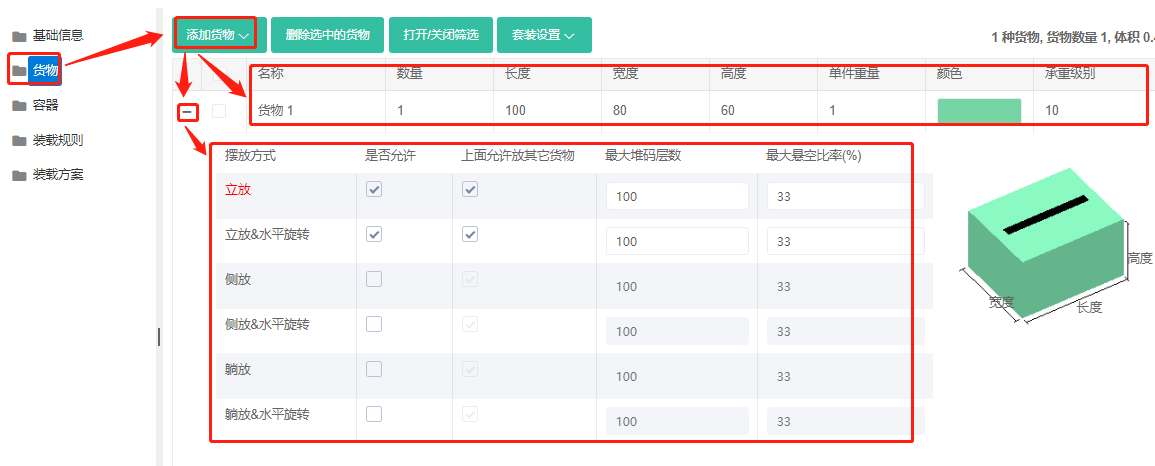
2) Batch import: when there are many cargo types, import in bulk via Excel. See "Excel batch import" for steps.
If the cargo database has already been initialized — that is, the cargo to be calculated is already in the database — see "Cargo Management" for steps.
You can use either of the following two methods:
1) Import from database: when there are few cargo types, click Add cargo → Add from database, check the desired cargo in the popup, click "Add" at the bottom, and finally edit each item's quantity and required loading parameters one by one. 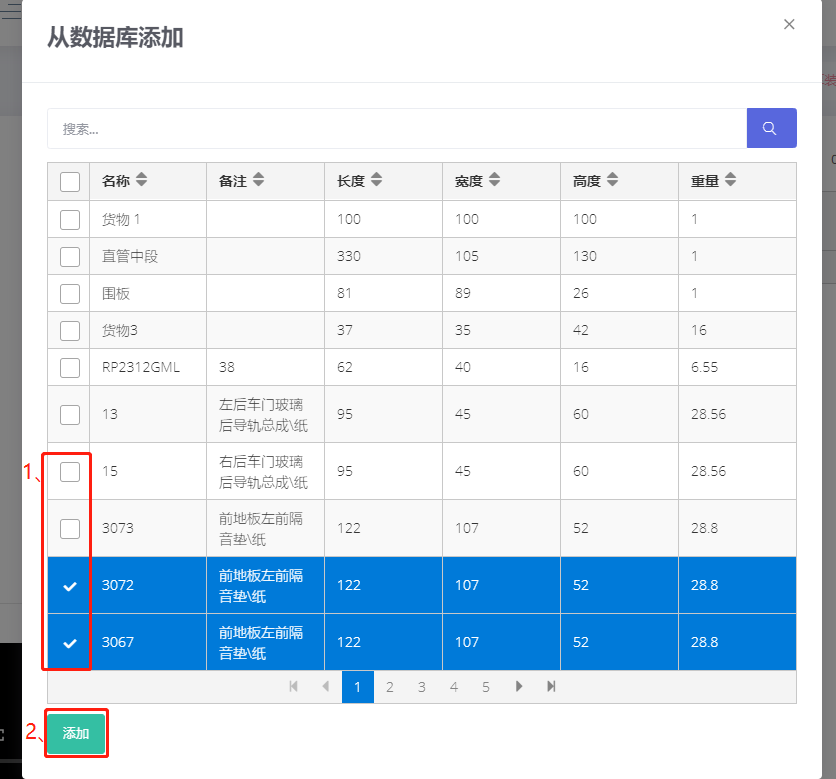
2) Import (Order Form Mode): when there are many cargo types, you can batch import quantities and loading parameters via "Import by order mode". See "Import (Order Form Mode)" for steps.