b. How to properly avoid container internal corner castings
Corner fittings are the two fasteners located at the top corners of a container. Although they do not take up much space, even experienced loading personnel often underestimate their impact, resulting in underloaded containers or cargo that cannot be loaded properly. With LoadMaster, users simply need to define the dimensions of the corner castings, and the system will automatically avoid them when optimizing the loading plan.
Step 1: Sign in and choose the task type. See Loading task.
Step 2: On the Cargo interface, add cargo directly or import in batch. See How to add cargo.
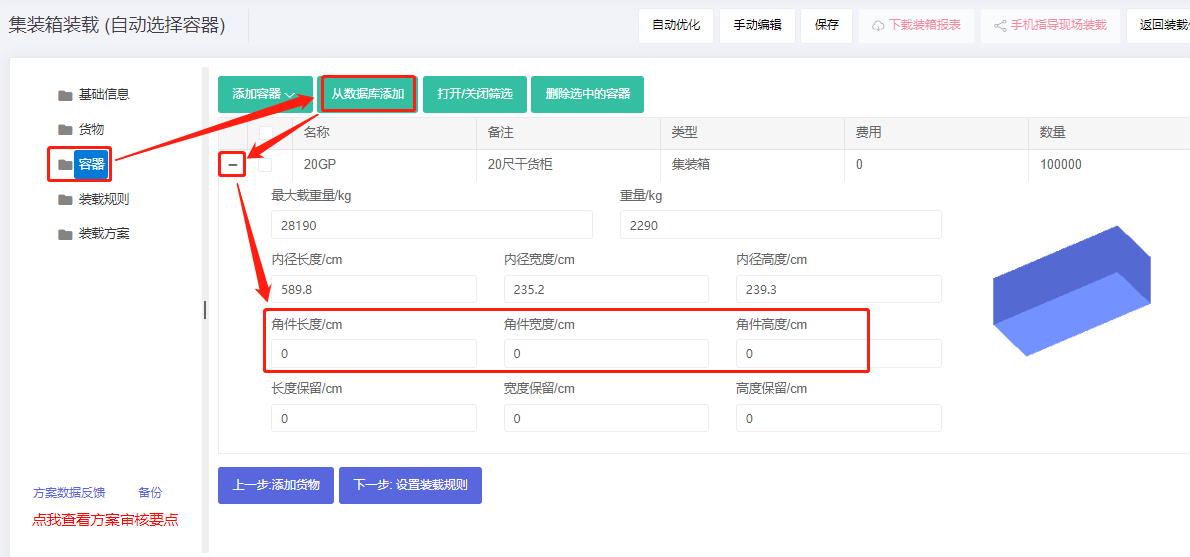
Step 3: On the Container interface, click "Import from database" to add the desired container. There are two corner castings inside, sized 10×10×10 cm. Configure as shown:
Step 4: On the Loading rules interface, keep defaults if no other requirements, then click Next.
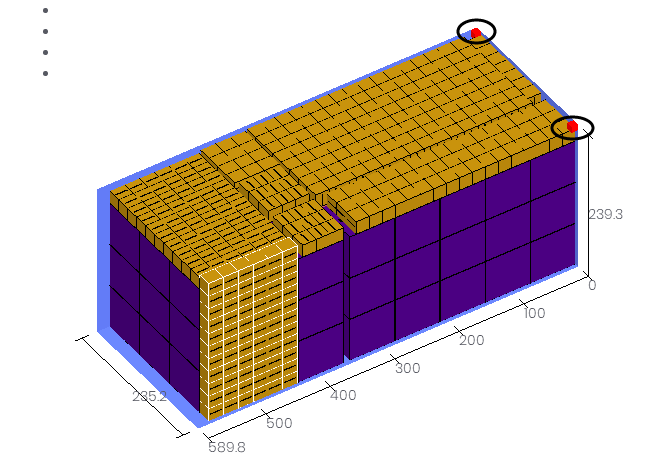
Step 5: Click Loading plan to view the 3D rendering.
Notes:
1) The default corner-casting value is zero. Users may enter the actual size. Corner castings are typically about 10 cm, usually no more than 15 cm.
2) Match the entered value to the chosen length unit. For a 10 cm casting in mm, set the unit to mm and enter 100. LoadMaster supports automatic imperial/metric conversion.