b. Container Management
LoadMaster provides a container database that lets you save commonly used container types and avoid repeated entry.
There are two ways: direct add and batch import. Choose "Import from Excel" or one-by-one "Add Container" depending on the amount of container data.
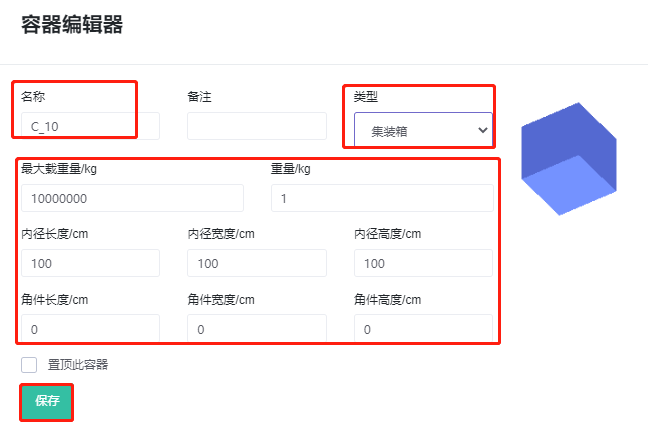
1) Add directly: Click "Add container", then edit the container's name (the name must be unique), type and the properties of that container type (see Container Properties). Finally click Save and the container is added to the database.
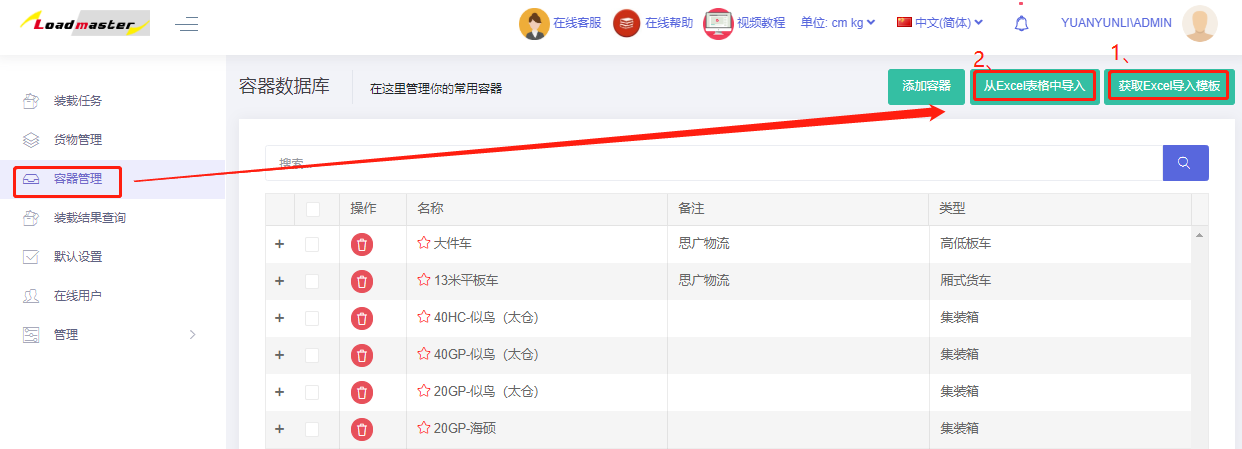
2) Batch import: In the container management interface upper-right: "Get Container Type Import template — fill in the template — Import from Excel".
Template instructions
- Container names must be unique; no duplicates.
- The Description column can have duplicates.
- Copy in the container's name, length, width and height — these are required fields. Note unit consistency.
- Define the container's type: 0 = carton; 1 = flat pallet; 2 = box pallet; 3 = container; 6 = platform lorry. Then define corresponding parameters based on container type.
After commonly used container information is maintained in the database, simply click "Add from database" on the container interface — there is no need to enter the container's dimensions and other information each time, further improving subsequent calculation efficiency.